Posts

Showing posts with the label iudtv apk

New IUDTV/UKWTV APK 2.1.7 version released!
Image
IUDTV/UKWTV APK now released new 2.1.7 version, with more live tv channels and VOD movies listed by different coutries, such as Greece, Brazilian, India, Arabic etc. If you are IUDTV/UKWTV user already, please confirm to update new version directly based on old apk; If you are new user, please click here to install new version apk directly, and contact us for free trial code to check channels first. WhatsApp/Skype: +86 176 8876 8267 Email: info@apkintvbox.com

How to switch decoding modes of IUDTV?

Image
When channels work not well, like buffering or cannot watch, we could try to switch the decoding modes first. Take IUDV  apk for an example, switch decoding modes by the following steps: 1. Click setting: 2. Choose Decoder, then choose the decoding mode accordingly; Contact by WhatsApp:  +8617688768267  for iudtv test code.

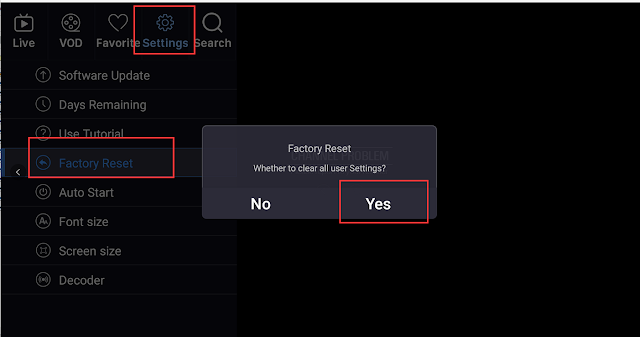
How to log out iudtv/ukwtv code of the apk?

Image
For IUDTV/UKWTV , if you want to change code or change device, need to log out the history code first. Just follow the step: Settings--Factory Reset-- Click Yes ; Then you could sign in with new code or change device to use same code. For more information and free trial. contact us: Email:  info@apkintvbox.com Skype: apkintvbox WhatsApp / Viber / WeChat: +8617688768267  

IUDTV Collect Favorite Channels Tutorial.

Image
IUDTV has so many channels that I want to collect my favorite channels to watch. How should I do? 1. Choose the channel you like; 2. Click the OK button for 3 seconds on your remote control; 3. Then you will get this information like the picture shows, and click Add to Favorite; 4. Now the channel is collected successfully that you could check it in Favorite; If you are interested in IUDTV , please contact me for free trial. Email: info@apkintvbox.com Skype: apkintvbox WhatsApp/Viber/WeChat: +8617688768267 Website:   www.apkintvbox.com  

IPTV channels so buffering, what should I do?

Image
Have you ever met this problem, that internet works great but video is buffering? Which means we need to clear the cache of iptv apk. The procedures as followed for your reference. 1. Open your TV main page, and choose Setting; 2. Click Apps and then choose the iptv apk that needs to clear cache; Here we take  IUDTV  apk for example, by the way its a very good IPTV for Arabic, Germany and Greece channels, and we have free test code in case that you are interested in it. 3. Then choose Clear cache, click it and then confirm.  Please feel free to contact us if any query, as well for iudtv free test code. Email: info@apkintvbox.com Skype: apkintvbox WhatsApp/Viber/WeChat: +8617688768267 Website:  www.apkintvbox.com