Posts

Showing posts with the label rockchip rk3566

X96 X6 Android Box LED Display Time Format

Image
Have you noticed that the X96 X6 rk3566 android 11 tv box LED display 24hours time format only?  X96 X6 tv box LED display only shows time with 24hours format, cause there is no AM/PM sign to distinguish.  When you choose 24hours time format by tv box Setting page, the tv screen will show time in 24hours time format, if dont choose, the tv screen time will be 12hours format. Meanwhile, X96 X6 android box LED display time format will always be 24hours format. Feel free to contact us to learn more parameters about the X96 X6 RK3566 android 11 tv box if you like it. WhatsApp: +86 176 8876 8267 Email: info@apkintvbox.com

2021 New Arrival HK1 RBOX R3 Smart Tv Box RK3566 Android 11 Review

Image
New Arrival HK1 RBOX R3 smart tv box equips rockchip rk3566 chip, android 11 OS 4G DDR4 and 8G DDR3 RAM, 32G 64G ROM, and supports built-in dual wifi 2.4G 5G, 1000M Ethernet with round shape design. HK1 RBOX R3 RK3566 TV Box Specifications: -CPU: RK3566 Quad-Core 64bit Cortex-A55 @1.8GHz -GPU: Mali-G52 2EE -Operation system: Android 11.0 OS -LAN: Ethernet:10/100M/1000M standard RJ-45 -WIFI: 2.4G /5G dual-band Wifi 802.11 a/b/g/n/ac -Card reader: Micro SD cards ,Maximum support 64G -USB: 1*USB2.0,  1*USB3.0 -High definition video output: 4K (4096x2160 pixel ) , 8K video decoder Connect the box with tv, the main page is simple, available YouTube, playstore and other apps, and you can drag other apps you like to the main page too.   Click Setting page to see the box parameters information below, and the HK1 RBOX R3 3566 smart tv box supports Rotation, that you could rotate screen to different directions!

X96 X6 Tv Box RK3566 CPU Antutu Benchmark Test Score

Image
X96 series android tv box has released new version X96 X6 with android 11 OS, rockchip rk3566 chip Quad-core CPU, and performs pretty good with Antutu Benchmark test.  X96 X6 tv box hardware specifications: OS: Android 11.0 CPU: Rockchi Rk3566 Box Quad-core Cortex-A55 64-bit. GPU: Mali-G52 MP1 Clock speed: 408-1800 MHz Vulkan: 1.1 Extensions: 100 Dual wifi: 2.4G/5G external antenna Bluetooth: V4.X X96 X6 antutu benchmark test score: Antutu – 134372 Wi-Fi – 100% on 5GHZ Band | 2.4GHz 50% LAN – 100% 1000 Mbps

How to Connect Bluetooth Remote Controller with X96 X6 Tvbox?

Image
The newest X96 X6 tv box is packaged with bluetooth remote controller, that we need to pair the tvbox with remote control by bluetooth connection first. Then could running the tv box, getting iptv apps for games and sports Euro2020! After turning on the tv box, cilck Setting--Remote&Accessories to search bluetooth signal; Then take out the remote control, click OK and BACK button at the same for over 3 seconds, till the tv box find remote signal. Next, click to pair the x96 x6 tv box with its remote control. Now the remote control has connected successfully with x96 x6 tv box, you can enjoy 4K HD videos from YouTube !

2021 Newest X96 X6 RK3566 Android 11 Tv Box Review!

Image
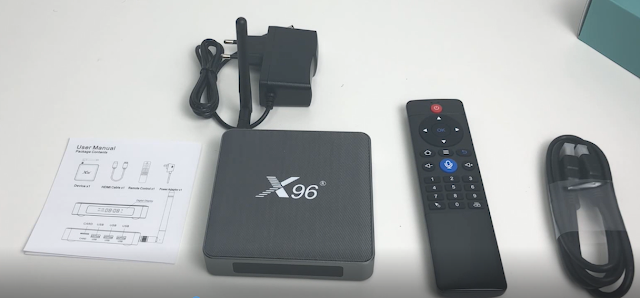
X96 X6 tv box android 11 has new stock available now, equips rockchip rk3566 CPU quad-core 64bit, GPU G52-2EE, with stronger image processing capabilities. And with unique Alumimum Materials design and external antenna for dual band wifi 2.4G/5G.                           X96 X6 tv box specifications: - Android 11 OS . -Rockchip RK3566 CPU Quad Core ARM Cortex A55. -Mali-G52 1-Core-2EE GPU OpenGL ES 1.1/2.0/3.2,OpenCL 2.0,Vulkan 1.1 support. -NPU: Neural network acceleration engine with processing performance up to 0.8 TOPS. -DRR4 4G/8G RAM, 32GB/64GB/128GB eMMc. -1* USB3.0   2 * USB2.0,   SD card for external storage. -Dual band wifi 2.4G&5G, external antenna. -BT V4.X -1000M Ethernet.  -Ultra HD 4K resolution H.265, 8K video decoding engine supported. The X96 X6 android 11 tv box package comes with the STB box, BT remote controller, HD cable, Power plug and User Maual. Fu...

How to Use iPhone Airplay to TV with X88 Pro 20 Android Box?

Image
We could use Airplay to steam videos and mirror iphone screen to our tv for bigger screen view. And it doesnt require Apple TV only, we could mirror screen our iphone, ipad to tv, android tv box, and also windows.  Today, we will show the detail steps to mirror screen iphone to x88 pro 20 android tv box. First of all, we need to install AirReceiverLite app on x88 pro 20 rk3566 tv box . you could find the app by Playstore and install directly, or download the apk file on computer first, then install by USB, like the following pictures.  Click the app and give permissions to the below information: Then check iphone and click Airplay, will show X88 pro 20 tv box information, and click it. Then we will get our phone screen shows on tv, and check phones, videos freely. One point, we need to confirm our iphone and x88 pro 20 android tv box connect same internet. We can check facebook, skype, whatsapp messages, and also youtube video on tv with Airplay iphone to tv. Whatsmore, when ...

How to Find H96 Max RK3566 Tv Box Mac Address/ SN?

Image
The newest android 11 tv box  H96 Max RK3566  doesnt have SN / Max address sticker on the behind of STB, so where do we find it? Connect H96 Max RK3566 android box with tv, and then go to Setting page; Click Device Preferances, go to next page, and click About; Then click Status, go to next page, you will get the MAC address, S/N information about H96 Max RK3566 tv box; Note, the IP address will be available when you connect internet with H96 Max 3566 android tv box. 

How to Update H96 Max RK3566 TV Box Firmware by USB file?

Image
Now the H96 Max RK3566 tv box has released new firmware updating to fix some bugs. And its easy to do it with USB directly. First and most important, reset the USB flash disk to be [ FAT mode], then download the h96 max rk3566 tv box new firmware file to USB. (dont do any changes about the file). Connect tv with h96 max 3566 tv box and turn it on, then connect USB with the tv box, that will identify the firmware file automatically. Click  Install  to update new firmware for tv box h96 max rk3566.  After the box reboot and updating firmware, the tv screen will turn black for about 7 minutes, and the box shows BOOT, instead of time.  When H96 Max RK3566 tv box finished firmware updating, the tv will restart itself, and the box will show time again. Then we can check Setting page about tv box information, the tv box firmware already updates to latest version.  Note, if the box already shows time after waiting around 7 minutes, but the tv screen still shows black, ...