Posts

Showing posts with the label smart tv box

Is it possible to use a smartphone as remote control?

Image
Q:  Can a smartphone be used as remote control for android tv box ? A:   If your smart phone is with infrared blaster technology, just need to download a universal tv-remote app like Anymote Smart IR Remote , IR Universion Remote or Galaxy Universal Remote , then can control many devices that receives IR signal by phone, such as set-top android box, dvb digital receiver, etc. 

2021 New Arrival HK1 RBOX R3 Smart Tv Box RK3566 Android 11 Review

Image
New Arrival HK1 RBOX R3 smart tv box equips rockchip rk3566 chip, android 11 OS 4G DDR4 and 8G DDR3 RAM, 32G 64G ROM, and supports built-in dual wifi 2.4G 5G, 1000M Ethernet with round shape design. HK1 RBOX R3 RK3566 TV Box Specifications: -CPU: RK3566 Quad-Core 64bit Cortex-A55 @1.8GHz -GPU: Mali-G52 2EE -Operation system: Android 11.0 OS -LAN: Ethernet:10/100M/1000M standard RJ-45 -WIFI: 2.4G /5G dual-band Wifi 802.11 a/b/g/n/ac -Card reader: Micro SD cards ,Maximum support 64G -USB: 1*USB2.0,  1*USB3.0 -High definition video output: 4K (4096x2160 pixel ) , 8K video decoder Connect the box with tv, the main page is simple, available YouTube, playstore and other apps, and you can drag other apps you like to the main page too.   Click Setting page to see the box parameters information below, and the HK1 RBOX R3 3566 smart tv box supports Rotation, that you could rotate screen to different directions!

New Arrival HK1 RBOX Tv Box Android 11.0!

Image
Rockchip RK3566 is the most hit and expected chip for 2021, and now HK1 Series tv box produced newest HK1 RBOX R2, and HK1RBOX R3 . Both boxes equiped RK3566 CPU Quad-Core 64bit Cortex-A55 @1.8GHz, Mali-G52 2EE GPU, as well as android 11.0 OS. Today, we take a review for HK1 RBOX R2 first. The pacage includes: -The android tv box. -One power supply. -One HD cable. -IR voice control remote! -User manual. HK1 RBOX R2 Tv Box Specifications: Android 11.0 OS: The TV BOX is based on Android 11.0 to enjoy increased APP application and browse all kinds of video resources. Rockchip RK3566 Quad-Core 64bit Cortex-A55. GPU: ARM Mali-G52 2EE supports OpenGL ES 3.2/2.0/1.0 Memory: DDR 4G/8G, eMMC 32G/64G Build in BT Voice Remote Control(No Gyros) Support Firmware Upgrade Online(OTA) AirplayD ENJOY BIG SCREEN : DLNA Supports ,DLNA,Miracast,Airplay. Miracast You can play games and watch movies on the big screen. Support H.265, 8K@24fps, 4K@60fps, HD 2.0, USB3.0 Support 1000M Ethernet,2.4G&5G D...

How to install KODI on X88 Pro 10 Android Tv Box?

Image
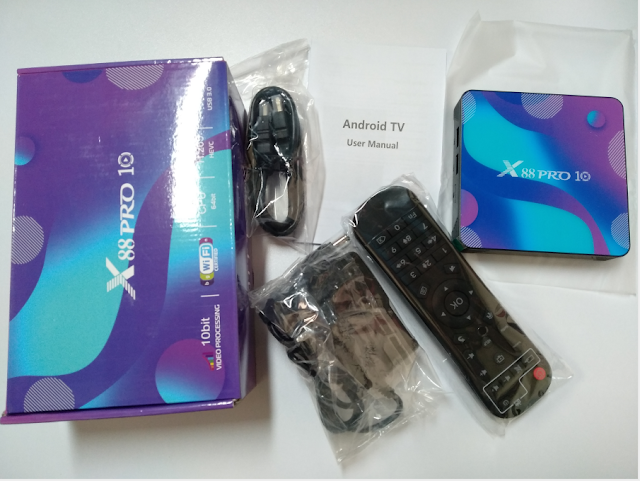
As we all know, KODI Player is a very good app to watch movies, videos. Today, we gonna show you how to install KODI app on the newest X88 Pro 10 Tv Box Android 10 OS. 1. After connecting x88 pro 10 android box with tv, click APPS on main page, and find the Calculator App, and input Ï€318 ;then will switch to next page shows that app is installing;  2. It will back to Calculator page when done installation, just need to exit the app, then we can find KODI app already installed successfully. Now we could check movies/channels directly! Feel free to contact us if you want to know more about the newest android 10 tv box ! Email: info@apkintvbox.com WhatsApp: +86 176 8876 8267

StrideBox Troubleshoting Q&A 1.4

What should I do when storage is insufficient? Certain applications run auto access and accumulate cache files and this will result in download failure of applications or system updates because of occupied space. The following steps will help you solve this issue: 1. Delete folders on the local disk: Homepage > My Apps > Explorer > Local Disk > Use the “Select” mode and “Edit” mode to delete related folders (e.g.: download folder and qianxun folder). 2. Restore default settings: Homepage > Settings > About TV Box > Restore Default Settings. What Should I do When the System Crashes? Try to reset the TV box to solve this issue by any of the following methods: * Attention! All applications and files installed in the disk will be deleted after reset. It is necessary to reset the internet, digital TV, and account. 【TV Box Interface】 How to set: Go to Settings → About TV Box → Restore Default Settings. 【Composite Key on Remote Control】 1. Reconnect the powe...

X88 King Amlogic S922X Review: Android 9.0 4G 128G TV Box

Image
The  X88 King TV box  is newest TV box that is built in the Amlogic S922X hexa-core CPU with 4GB RAM / 128GB internal storage, which is better at picture handling, with a superior encounter of ultra-quick running pace and expert picture preparing capacity. It is good for streaming movies and TV shows, especially 3D gaming. X88 King TV Box  runs on Android 9.0 OS , with fast and smooth execution, and is intended to transform the standard TV into a shrewd one. It works in HDMI 2.0 transmitter including both controller and PHY with HDR, CEC and HDCP 2,2. The HDMI link will likewise in the bundle. It additionally plays 4K Ultra High Definition. X88 King Hardware CPU – Amlogic S922X 1.8GHz  GPU – Mali G52 MP6  RAM – 4GB DDR4 ROM – 128GB smart tv box android 9.0 x88 king WiFi – 2.4GHz + 5GHz LAN – 1000Mbps Bluetooth – 5.0 Firmware Features Rooted Alternative Launcher Compatible DRM Google Widevivne Level 3 Netflix 480p Good movies stream ap...

StrideBox Troubleshoting Q&A

SrideBox  Internet Problems Q: Cannot Connect to the Internet via Ethernet A: 1. Check if the Ethernet cable is securely connected to the port on the TV box.   Reboot the router. 2. Check if the Ethernet can successfully connect to the Internet. 3. Connect the internet cable of the TV box to a laptop or other device to confirm   if the network functions normally. 4. Make sure Ethernet is not in PPPoE mode. If it is necessary to enter an account   and password when using other devices (such as computer) to connect, then   the Ethernet may be in PPPoE mode. Please use the router as well when using   the TV box. Q: Cannot Connect to the Internet via Wi-Fi A: 1. Check if the signal of the Wi-Fi base station is strong enough and settings are   correct. 2. Setup: “Settings ” → “ Network Settings”: Select SSID to Use → Enter the   Password → Connect. 3. If your device cannot detect the SSID, please make sure the Wi-Fi base station   ...

X88 Pro with RK3318 Rockchip Android tv box review

Image
X88 Pro   is a HD media player with the Soch  Rockchip RK3318   android 9.0 smart tv box. This TV-Box we have 3 versions options:   2/4GB  of DDR3 RAM and  16/32/64GB  internal storage, has a WiFi a/b/g/n + BT 4.1 adapter and operating system has  Android 9.0 . Specifications: Rockchip RK3318 Quad-Core 64bit Cortex-A53. GPU:Penta-Core Mali-450. Android 9.0 OS。 Support H.265,4K 60pfs,HD 2.0,USB3.0,USB2.0. Support 10/100M Ethernet. Support Firmware Wireless Upgrade Function(OTA). X88 Pro Android TV-Box can be used as a basic media player with KODI or IPTV and we can also run simple games without too much demand for resources, as well as YouTube and Netflix.

H96 MAX+ with the new Rockchip RK3328 Review

Image
H96 Max+  is the Android Tv-Box of new model that has the well-known  RK3328   Quad Core Chipset, which integrates enough hardware to use it as a media player in a smooth way. This model is advertised as compatible with Netflix HD. Inside the TV-Box with 4GB RAM memory and it has versions with 32GB or 64GB storage optional. Materials and measures : Plastic / 3.8 x 3.8 x 1.2 inches (98 x 98 x 26 mm / 0.3 lb (120 gr) Interfaces : HDMI 2.0a 4K @ 60fps / AV Jack 3.5mm / 2x USB 2.0 / 1x USB 3.0 / microSD / Reset in audio jack Leds and panel : Frontal led status / No panel Package content : IR remote control with light / Manual / DC adapter 12V 3A Europlug / Manual in English. Remote control : The RF remote control with USB adapter is very simple and has a button to use the microphone with Google Assistant, we can only use it with this app and it does not work in other apps with search option like Youtube.  Launcher : Launcher based on squares, customiza...

Newest T96D Android Smart Tv Box Unbox!

Image
T96D Android TV BOX Android 9.0 Version Smart TV Box 2GB 16GB, and with Amlogic S905W chipset, Quad Core dual wifi 4k Media player. Detail Specifications:  -OS: Android 9.0 -RAM/ROM: 2GB 16GB -CPU: Amlogic S905W quad core -GPU: Penda-Core Mali-450 -Support: H.265, 4K, HDR, HD2.0, USB2.0 -Support: 10/100M Ethernet, 2.4G/5G Dual Wifi About Netflix: -Most of tv box do not support Netflix because of the copyright issues, now we pre-install the Netflix(Version 4.7.0,which is specially selected, and we've run a lot of testing and debugging for stable and smooth streaming experience).  Feel free to contact us if you like this android tv box and want to know more about it. WhatsApp: +86 176 8876 8267

New UKWTV/IUDTV APK for Android Smart TV Box!

Image
Newest IUDTV apk version with 4k android smart tv box! Apk free download link and check details with free trial code. WhatsApp: +86 176 8876 8267 Email: info@apkintvbox.com