Posts

Showing posts with the label x88 pro 10

X88 Pro 10 RK3318 Firmware Updates

Image
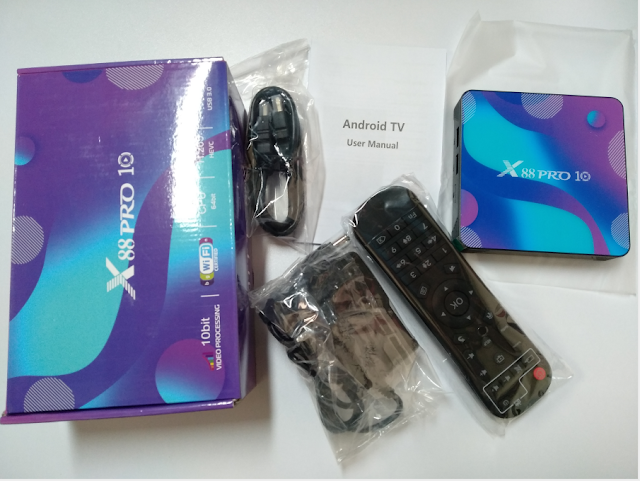
  X88 Pro 10 RK3318 Firmware Updates X88 Pro  10 is a  4K media player with the Soch  Rockchip RK3318  android 10.0 smart tv box.  This TV-Box we have 4 versions options:   4/32GB  of DDR3 RAM and  32/64/128GB  internal storage, has a WiFi a/b/g/n + BT 4.0 adapter and operating system has  Android 10.0 . ◆OS Android 10.0 ◆USB Host USB3.0, USB2.0 ◆LAN/Ethernet 10/100M standard RJ-45 ◆Wireless/Wifi 2.4G /5.8G ◆BT V4.0 ◆Power Supply 5V/2.5A You can follow this video to watch the specific steps.     Something you need to note: There is a problem with the X88 pro 10 Android 11 version, which may cause the wifi to not work. So we recommended  not to upgrade to 11.0. Because the wifi module models are different, many customers cannot connect to wifi after upgrading. If you upgrade to Android 11, you don’t have to worry. I will attach the firmware link below. You can flash the Android 11.0 version back to the Android 10.0 ver...

X88 Pro 10 TV Box Android 11 System Update!

Image
X88 Pro 10 android box now has released android 11 system version, follow the steps below to update, and then you will new UI and more APPs. When you connect the x88 pro 10 tv box and turn on tv, you will get system update note on the screen, click DOWNLOAD . Then just wait the progress bar goes to 100% and finish system update automatically. The X88 Pro 10 tv box will restart over after done system update. And now we get x88 pro 10 tv box new UI with android 11 OS version . It supports Family Cloud that you could upload family's pictures to the box and use as wallpaper. Here we can check x88 pro 10 android box parameters first. Click Settings -- Device Preferences , and click About .  We will find that the x88 pro 10 tv box now already updated to android 11 OS version.  You could update the system first, and check apps working spercifications. Feel free to contact with us if any problem about X88 Pro 10 Android 11 tv box . WhatsApp: +86 176 8876 8267 Could also check video...

How to install KODI on X88 Pro 10 Android Tv Box?

Image
As we all know, KODI Player is a very good app to watch movies, videos. Today, we gonna show you how to install KODI app on the newest X88 Pro 10 Tv Box Android 10 OS. 1. After connecting x88 pro 10 android box with tv, click APPS on main page, and find the Calculator App, and input π318 ;then will switch to next page shows that app is installing;  2. It will back to Calculator page when done installation, just need to exit the app, then we can find KODI app already installed successfully. Now we could check movies/channels directly! Feel free to contact us if you want to know more about the newest android 10 tv box ! Email: info@apkintvbox.com WhatsApp: +86 176 8876 8267