Posts

Showing posts with the label android box

QHDTV BIGGEST DISCOUNT EVER!!

Image
To celebrate the Christmas and New Year holiday, we now offer the biggest discount ever for iptv subscriptions! Including QHDTV/QURTV, SUBTV/BMYTV, IUDTV/UKWTV, POPTV, Best HD, etc.. https://xtrixtv.net/product-category/subscription/ Click the link to find out your iptv subscription and renew directly! For example, now Qhdtv one year subscription only 38$!  And 4.99$ for Brazil TV Monthly subscription. Wish you guys Merry Christmas and Happy New Year! WhatsApp: +86 176 8876 8267 Feel free to contact us any time!
How to install KODI on X88 Pro 10 Android Tv Box?

Image
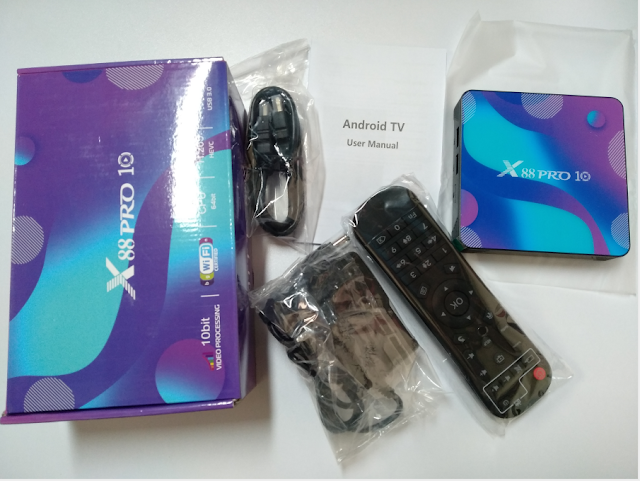
As we all know, KODI Player is a very good app to watch movies, videos. Today, we gonna show you how to install KODI app on the newest X88 Pro 10 Tv Box Android 10 OS. 1. After connecting x88 pro 10 android box with tv, click APPS on main page, and find the Calculator App, and input π318 ;then will switch to next page shows that app is installing;  2. It will back to Calculator page when done installation, just need to exit the app, then we can find KODI app already installed successfully. Now we could check movies/channels directly! Feel free to contact us if you want to know more about the newest android 10 tv box ! Email: info@apkintvbox.com WhatsApp: +86 176 8876 8267

StrideBox Troubleshoting Q&A 1.4

What should I do when storage is insufficient? Certain applications run auto access and accumulate cache files and this will result in download failure of applications or system updates because of occupied space. The following steps will help you solve this issue: 1. Delete folders on the local disk: Homepage > My Apps > Explorer > Local Disk > Use the “Select” mode and “Edit” mode to delete related folders (e.g.: download folder and qianxun folder). 2. Restore default settings: Homepage > Settings > About TV Box > Restore Default Settings. What Should I do When the System Crashes? Try to reset the TV box to solve this issue by any of the following methods: * Attention! All applications and files installed in the disk will be deleted after reset. It is necessary to reset the internet, digital TV, and account. 【TV Box Interface】 How to set: Go to Settings → About TV Box → Restore Default Settings. 【Composite Key on Remote Control】 1. Reconnect the powe...

StrideBox Troubleshoting Q&A

SrideBox  Internet Problems Q: Cannot Connect to the Internet via Ethernet A: 1. Check if the Ethernet cable is securely connected to the port on the TV box.   Reboot the router. 2. Check if the Ethernet can successfully connect to the Internet. 3. Connect the internet cable of the TV box to a laptop or other device to confirm   if the network functions normally. 4. Make sure Ethernet is not in PPPoE mode. If it is necessary to enter an account   and password when using other devices (such as computer) to connect, then   the Ethernet may be in PPPoE mode. Please use the router as well when using   the TV box. Q: Cannot Connect to the Internet via Wi-Fi A: 1. Check if the signal of the Wi-Fi base station is strong enough and settings are   correct. 2. Setup: “Settings ” → “ Network Settings”: Select SSID to Use → Enter the   Password → Connect. 3. If your device cannot detect the SSID, please make sure the Wi-Fi base station   ...

X88 Pro X3 Review: Amlogic S905X3 Android 9.0 TV Box

Image
The New  X88 Pro X3  smart tv box is android 9.0 OS Quad Core with  Amlogic S905X3 rockchip  that integrates a  Mali-G31 MP2  GPU and allows native  H.265  and  VP9  video decoding up to 4 K@75fps , as a 8K media player that supports Google, YouTube, Netflix as well as Kodi, providing the highest quality and precision in 8K video playback. Detail spercifications of the x88 pro x3 smart tv box: 1.  Android 9.0 OS ; 2. Amlogic S905X3 Quad-core 64bit Cortex-A55. 2. GPU: Mali-G31 MP2. Good colors and acceptable processing. 4. ROM/RAM: 4G 32G/64G/128G optional. 5. Support HD 2.1for 4k@60Hz; Dolby Vision, Advanced HDR10, HDR10 +, HLG, PRIME HDR and support for REC709 / BT2020 profiles. 6. Support Miracast, DLNA, Airplay. 7. 2.4G/5G   Dual Wifi ; 1xType-A USB3.0, 1xType-A USB2.0. With HDMI 2.0 output, X88 Pro X3 Box supports H.265 4K output, more powerful than H.264, that you watch the 8K movie smoothly, and every detail of the s...

Lifetime Free Singapore Malaysian Channels TV iptv replace V9 Super box

Image
Singapore Fiber TV Box TurboTV IPTV Box With China HK TaiWan Japan Korea Singapore Malaysia Thailand Indian Food Movie and Sports Channels FREE! Only needs internet, then you can watch all Live tv channels and Vod in Singapore and other all countries. No need to plug Starhub tv antenna line to watch channels. Tips: *Turbotv box, for android box with life time free. 1.Plug and play with 100% Automatic Channels data updating. 2.Live TV channels from China,HK,TaiWan,Singapore, Malasia, Korea,India Channels 3.Reliable Server providing stable watching experience 4.High image quality with smooth streaming 5.VOD function provides hot movies,TV dramas playback from US,UK,HK and China. Mainlad 6.No Annual Fee forever . No monthly fee forever. If you want to check full list. pls contact with seller. Advantages of Turbo TV box: 1. You can watch Starhub tv channels and other channels in Singapore and other any countries only if there is internet. 2. You can buy Andr...

H96 MAX+ with the new Rockchip RK3328 Review

Image
H96 Max+  is the Android Tv-Box of new model that has the well-known  RK3328   Quad Core Chipset, which integrates enough hardware to use it as a media player in a smooth way. This model is advertised as compatible with Netflix HD. Inside the TV-Box with 4GB RAM memory and it has versions with 32GB or 64GB storage optional. Materials and measures : Plastic / 3.8 x 3.8 x 1.2 inches (98 x 98 x 26 mm / 0.3 lb (120 gr) Interfaces : HDMI 2.0a 4K @ 60fps / AV Jack 3.5mm / 2x USB 2.0 / 1x USB 3.0 / microSD / Reset in audio jack Leds and panel : Frontal led status / No panel Package content : IR remote control with light / Manual / DC adapter 12V 3A Europlug / Manual in English. Remote control : The RF remote control with USB adapter is very simple and has a button to use the microphone with Google Assistant, we can only use it with this app and it does not work in other apps with search option like Youtube.  Launcher : Launcher based on squares, customiza...

Newest T96D Android Smart Tv Box Unbox!

Image
T96D Android TV BOX Android 9.0 Version Smart TV Box 2GB 16GB, and with Amlogic S905W chipset, Quad Core dual wifi 4k Media player. Detail Specifications:  -OS: Android 9.0 -RAM/ROM: 2GB 16GB -CPU: Amlogic S905W quad core -GPU: Penda-Core Mali-450 -Support: H.265, 4K, HDR, HD2.0, USB2.0 -Support: 10/100M Ethernet, 2.4G/5G Dual Wifi About Netflix: -Most of tv box do not support Netflix because of the copyright issues, now we pre-install the Netflix(Version 4.7.0,which is specially selected, and we've run a lot of testing and debugging for stable and smooth streaming experience).  Feel free to contact us if you like this android tv box and want to know more about it. WhatsApp: +86 176 8876 8267

Merry Christmas!

Image
  Merry Christmas and Happy New Year! Now all iptv package  25% OFF! Including QHDTV, POPTV, IUDTV, SUBTV, Best HD, FEXTV, YOUMAG, IVIEW, XTRIX, ATV, MYIPTV4K, MYPADTV. WhatsApp/Skype: +86 176 8876 8267

DVB-T2 C01S Box with TV Antenna for free channels!

Image
DVB-T2 C01S Box with TV Antenna to get Free TV Channels! WhatsApp/Viber: +86 176 8876 8267

Best Arabic IPTV Box: X88 Pro smart tv box with poptv subscription!

Image
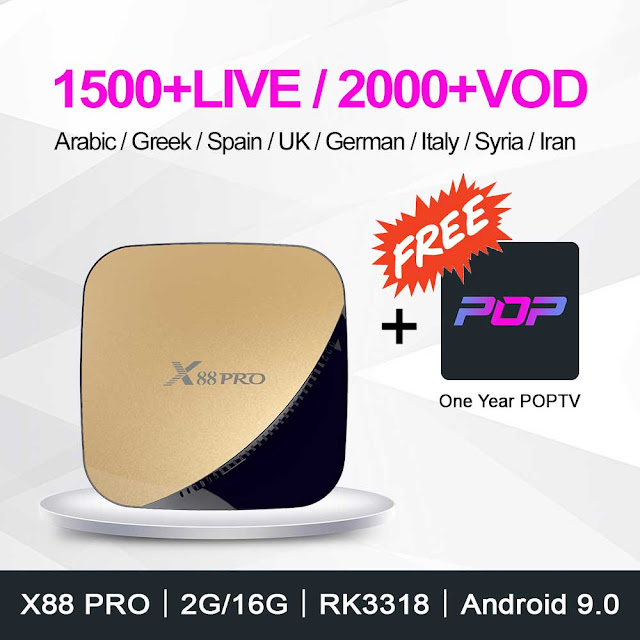
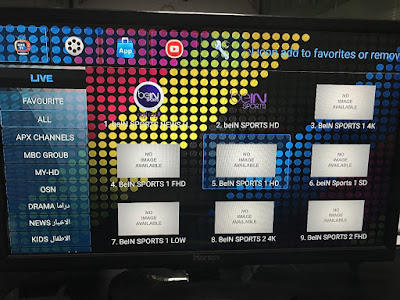
The new X88 PRO android 9.0 tv box with the Rockchip RK3317 chips, now with FREE poptv yearly subscription that includes Arabic, French, Germany...thousands of live tv channels, as well as tv series and movies! RK3318 SoC – Quad-Core 64bit Cortex-A53 CPU with Penta-Core Mali-450 GPU 16/32/64GB of EMMC storage Android 9.0 2/4GB or SDRAM 16G/32G/64G 2.4G /5G dual-band Wifi 802.11 a/b/g/n 2 USB Type A ports – 1 x USB3.0, 1 x USB2.0 Ethernet:10/100M standard RJ-45 HDMI 2.0a for 4k@60Hz (3840×2160) The full package is including a small tv box, an instruction leaflet, a remote control, and power adapter, HDMI cable.   X88 PRO box is a flat device that's just over 4″ wide with a curved two-tone plastic shell. At the side it has a Micro SD card slot plus USB 2.0 and USB 3.0 ports while at the back there's power, S/PDIF optical audio, HDMI, Ethernet and A/V sockets. There's also a LED indicator in the front that lights up blue while in use but turns red when in...

New UKWTV/IUDTV APK for Android Smart TV Box!

Image
Newest IUDTV apk version with 4k android smart tv box! Apk free download link and check details with free trial code. WhatsApp: +86 176 8876 8267 Email: info@apkintvbox.com

Best HD iptv server updating

Note: Recently engineers sport team working on Best HD iptv server updating, which will influence some channels signal. All channels list will be maintained and more stable when iptv server done update! Contact us if you want to test: WhatsApp/Viber/Skype: +86 176 8876 8267

How to logout Best HD account on android box?

Image
For Best HD apk on android box, we need to log out the account first when want to change device, or change new account. 1. Click MENU button on remote control to get setting page; 2. Click Setting and choose Defaults; 3. Confirm Reset to defaults; We offer 2 days free test code for Best HD iptv, contact by WhatsApp for free trial; WhatsApp: +86 176 8876 8267

How to install iview hd app on android tv box with USB flash disk?

Image
Normally the apk download link is too complicated, so we can open and download it on computer first, then install it on android tv box with USB flash disk. 1. prepare a USB flash disk; 2. Connect it to your computer, then input the link to download it on your USB flash disk; 3. Then connect USB flash disk with your android box, 4. Click My Apps- choose FileBrowser to find the apk file just donwloaded; 5. Click the apk file to install it. Contact by whatsapp:  +8617688768267 for more information.

OLITV--How to Change Launguage?

Image
OLITV  apk supports Chinese, English and Thai, 3 languages; and we could change language we like for better user experience. 1. Click your remote control to choose Setting; 2. Choose Language setting; 3. Then choose your language; OLITV aims for Japanese and Korea channels, contact me for free trial, if you like it. WhatsApp:  +8617688768267

Olitv--How to Change Device?

Image
How should I do to use OLITV on a new box? First, open OLITV app on your old device, and click Account Info: Second, r emember your account and the password which is necessary for switching device; Third, open   OLITV apk on your new device; Then, Input the account and password; Now you can use it on your new device. Contact me for free trial or any query. WhatsApp:  +8617688768267

Best IPTV play list URL added tutorial

Image
Best IPTV supports android box and Samsung smart tv. If you use it with android tv box, after done with apk installation , need to add the play list first to watch channels.  First. Open the Best IPTV APK and click +Add playlist, choose Add URL. Then, input the whole URL playlist right and click ok. Then you will get detail channel list, like USA channels, French channels, Arabic channels, Sports channels.  If any query, please contact by WhatsApp :  +8617688768267

Brazil and South American Channels Best Choice---Color TV & Color VOD

Image

How to Collect My Favorite Channels of FEXTV iptv?

Image
I want to watch my favorite channels easily when I open FEXTV , what should I do? 1. Choose one your favorite channel;  2. Click the OK button on your remote control for 2 seconds; 3. Then there will be a little star at the left corner of the channel you chose, which means you collected it successfully; 4. Click FAVOURITE, you could check the channels you have collected. FEXTV is a good choice if you like to watch Arabic&African channels, contact me for free trial. Email: info@apkintvbox.com Skype: apkintvbox WhatsApp/Viber/WeChat: +8617688768267 Website:  www.apkintvbox.com