How to Collect My Favorite Channels of FEXTV iptv?
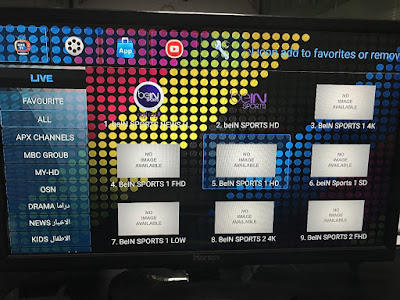
I want to watch my favorite channels easily when I open FEXTV , what should I do? 1. Choose one your favorite channel; 2. Click the OK button on your remote control for 2 seconds; 3. Then there will be a little star at the left corner of the channel you chose, which means you collected it successfully; 4. Click FAVOURITE, you could check the channels you have collected. FEXTV is a good choice if you like to watch Arabic&African channels, contact me for free trial. Email: info@apkintvbox.com Skype: apkintvbox WhatsApp/Viber/WeChat: +8617688768267 Website: www.apkintvbox.com