Posts

Showing posts with the label dvb t2 s2 combo cccam

DVB T2-S2 Combo Online Upgrade Operation Tutorial
Image
The DVB T2 S2 Combo  receiver high definition digital Terrestrial/Satellite tv receiver supports to upgrade the STB version by Online Upgrade option. First, go to setting page after connecting decoder dvb t2 s2 combo android box with tv, and click Tools. Step1: Make sure the STB is well connected to internet, then enter Online Upgrade interface. Step2: Select Upgrade Mdule by press VOL+/- button on remote. Step3: Check the update status available or not, if yes, please use this option to update the STB. Step4: Press RED color button, DVB Combo T2 S2 tv box will Start update directly. 

How to Update DVB Combo T2 S2 Box STB by USB/Card Upgrade?

Image
For the further introduction about the best dvb receiver  DVB T2 Combo set top box, Tools page allows to check the STB's firmware, set STB back to Factory Default and Backup the STB's data for hd dvb-t2&s2 combo update. Follow the steps below to upgrade hd dvb-t2&s2 combo firmware by combo dvb t2+s2 hd digital satellite tv receiver USB/Card Upgrade option: Step1: Get dvb t2 s2 tv updated firmware (a file in .bin format) from our engineers, then move it to a USB flash drive (USB 2.0 version will be perfect match). Step2: Plug in the USB flash drive to the STB, the tv screen will show Device Connected . Step3: Go to the Tools MENU page, and move cursor down to USB/Card Upgrade option, then press OK button on remote control to confirm Yes for software updating. Step4: Select correct firmware file which listed on the USB flash drive and press OK button on remote controller. The progress bar will show up as the following picture. Note: Dont power off the DVB T2 S2 combo ...

DVB T2 S2 Combo Terrestrial Channel Search Tutorial

Image
DVB T2 S2 Combo digital receiver tv box supports dvb t2 singal antenna and dvb s2 tuner channels search with tv antenna , dvb t2 receiver YouTube, dvb s2 cccam receiver, and also could add iptv subscription channels with android box dvb t2 s2 iptv stream. Today's blog, we will introduce you how to search dvb t2 terrestrial manual channels by DVB-T2 mode. Follow this operating sequence [ Main MENU - Installation - DVB T2 ] to enter below "DVB-T2" channel search interface on dvb t2 s2 combo manual. This MENU allows USER to search/scan dvb signal for Terrestrial Channel by Auto or Manual mode. - How to set Auto Search? Step1: Select the Country where you live in currently, which would affect whether the dvb t2 s2 set top box can receive signal or not. Step2: Adjust the option [ LCN and Active Antenna ] if necessary through hd dvb-t2&s2 combo setting.  Step3: Move the highlight cursor up to <Auto Search> and press <OK> button, the DVB T2 receiver box will swi...

DVB T2&S2 Combo Satellite Channel Search Tutorial

Image
The DVB T2&S2 Combo multi-media tv receiver allows user to set up the satellite channel search(DVB-S2) nd terrestrial channel search(DVB-T2). First of all, we introduce the Satellite Channel Search Operation (DVB-S2): Press MENU button bring up the main MENU and move cursor down to Installation , then select DVBS2 option. The system will enter below interface. There are 5 options available for different settings.       1. Antenna Setting: Please follow the screen hints to finish corresponding setting on each option: LNB Type, LNB Frequency, Transponder, 22KHz, LNB Power, Tone Burst Mode, DiSEqC Mode and DiSEqC 1.0. After finished above setting, USER could search channel by below options: Option1 : set single Stellite Search by press Red color button, the STB will enter next interface, finish corresponding setting on Polarisation, Network Search, Channel Type, Scan Type, Scan Type, then press OK button to enter next interface and STB will start Scan, please wait till...

DVB T2 S2 Combo Digital Tv Receiver Internet Configuration by USB Dongle!

Image
The DVB T2-S2 Combo satellite tv receiver digital box is no network interface, so we need to use USB dongle with DVB t2/s2 tuner to receive wifi signal for internet connection. First of all, get a USB dongle, and connect it with DVB-T2&S2 box.  Open tv after connected dvb t2/s2 set top box by HD cable; Click Internet Center , and choose Internet Configuration; Then click Config , and wait, you will get wifi signal available in the list. Choose the wifi you want to connect, input Password , then click Link . If succeed, you will get message "Network connection success". Then you can watch DVB combo Cccam and YouTube , Google, or iptv subscription channels directly.  Btw, you can also share your mobile phone internet for DVB T2/S2 internet connection, follow the same steps to connect wifi. Check our YouTube channel for detail operations by video! Contact whatsapp for more details or if you have any query about combo dvb t2+s2 hd digital satellite tv receiver .

DVB T2&S2 Combo Satellite Tv Receiver Digital Box Review.

Image
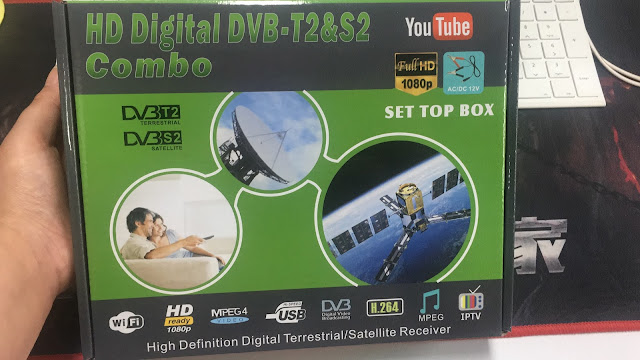
HD DVB T2 S2 Combo CCCAM box has upgrade newest system version this year, and supports iptv streams, Google play, YouTube, H.264 Full HD 1080P, with certified Hi-speed USB connection satellite tv receiver set top box.  You can connect the DVB T2&S2 combo box with TV set by HD cable or RCA cable. And connect outdoor or indoor tv antenna to receive terrestrial signal.          Specifications: 1. DVB-T2/DVB-T compatible, supports MHEG4 Cccam 2. Compatible with 576i/576p/720p/1,080i/1080P video formats 3. MST 7T00(AC3) chipset solution(Truly AC3 Surround) 4. Fully compliant with DVB-T2 standard 5. Supports HDMI 2.0 (1080P) 6. Auto and manually scan all available TV and radio channels,Parental guidance locking 7. Auto/manual program search, multi-language supported 8. Supports MPEG-1, MPEG-2, MPEG-4 and H.264 decoder (up to 1,920 x 1,080 pixels) 9. Powerful and highly effective 7days EPG function 10. USB2.0 host support upgrade, PVR, time shifting and media ...