Posts

Showing posts with the label myiptv4k pincode

How to install Myiptv4k Apk on FibreMedia Box with USB Flash Disk?

Image
Can we install third-part apk on the new Singapore FibreMedia TU160 box? Today's video is about how to install myiptv4k apk on the box by USB Flash Disk, which is very easy. Check the vedio for details first now! Box detail introduction link: https://apkintvbox.com/product/newest... WhatsApp: +86 176 8876 8267 And we offer free trial first for Fibre TV channels now, feel free to contact us if you are interested in the FibreMeida TU160 Smart TV Box!
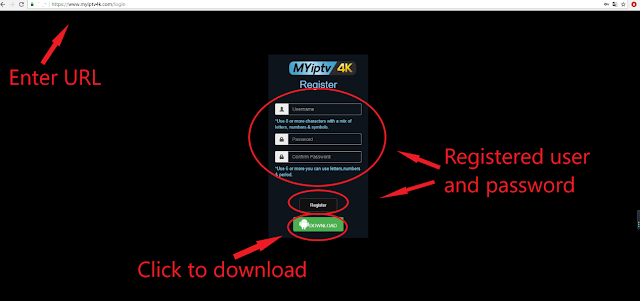
MYIPTV4K APK new version download

MYIPTV 4K APK now has updated to version 1.34 Here is the new version apk download link, please install it and login with myiptv 4k account. https://www.iptvintvbox.com/download/myiptv-4k-download/ WhatsApp: +86 176 8876 8267 for myiptv4k trial.

Can use MYIPTV4K pincode with other account?

MYIPTV4K pincode can only use with one username and password. Once it is activated for one account, cannot use it again with other account. If any query, contact us: Email:  info@apkintvbox.com Skype: apkintvbox WhatsApp/Viber/WeChat: +8617688768267 Website:  www.apkintvbox.com  /  store.apkintvbox.com

MYIPTV4K register and activate tutorial

Image
1. Open the website  https://myiptv12k.com/  to register username and password,  Install MYIPTV4K apk to your android box. 2. After installation, click and open it. 3. Input myiptv4k username and password to sign in; 4. Choose TOPUP; 5. Enter myiptv4k pin code which got from your seller to top up.  6. After activating it, you can enjoy detail channels list . Please contact me for more detail information. Website: https://xtrixtv.net/ WhatsApp/Viber/WeChat: +8617688768267 IPTV Renew and Subscription:  https://xtrixtv.net/product-category/subscription/